Trying To Make A Binary Cask With Homebrew
Failing to produce a useful Homebrew Cask for open source software; it should have just been a formula
homebrew is kinda weird compared to Debian and apt, but it is quite thorough and
means I can keep almost all my software on macOS up-to-date with just brew upgrade. For the
things it didn't have, though, I'd usually just install from source to ~/.local/bin and then
leave it un-upgraded forever, which is not ideal. I thought I'd actually do it a bit more properly today, and,
well, at least the "copy these binary files" part is not very complicated.
Jargon#
First, some jargon, since I can never remember what anything is in brew-land:
- A formula is a package definition for installing open source software from source (or community-provided prebuilt binary bottles) in the form of a Ruby file
-
A cask is a package definition for installing a binary, often a proprietary GUI app, which
will be a
.rbfile in theCasks/directory of a tap -
A tap is a Homebrew "repository", somewhere it can download formulas and casks
from (usually public
gitrepositories)
Getting Started#
I want to install coop, from trailofbits, a sandbox for running coding agents. Since upstream already ship binaries, I thought I'd try
to use them, by creating a cask that just downloaded them from GitHub and installed them.
First I need a tap to put it in. The simplest way is to use GitHub, so let's do that:
brew tap-new rweir/homebrew-tap
On aarch64/macos at least, this creates a local git repository (owned by me) in /opt/homebrew/Library/Taps/rweir/homebrew-tap. Then create a matching repository on GitHub and push to
it:
gh repo create "rweir/homebrew-tap" \
    --push --public \
    --source "$(brew --repository "rweir/homebrew-tap")"
Now you have a personal tap, which you and anyone else can tell their local brew to
use:
brew tap rweir/tap
brew implicitly strips the homebrew- from the repository name, so GitHub repo name
rweir/homebrew-tap maps to brew tap argument rweir/tap.
So, I ask brew to create the basic cask file for me to fill in:
brew create --cask \
    https://github.com/trailofbits/coop/releases/download/v0.6.0/coop-v0.6.0-aarch64-apple-darwin.tar.gz \
    --tap rweir/homebrew-tap \
    --set-name coop
Then just draw the rest of the owl:
cask "coop" do
  version "0.6.0"
  sha256 "2eb045bbbb24e25c995500f93146eea5ee866595f9042ad441cb930d7ada3ed6"
  depends_on arch: :arm64
  depends_on :macos

  # Where to download the binary from
  url "https://github.com/trailofbits/coop/releases/download/v#{version}/coop-v#{version}-aarch64-apple-darwin.tar.gz"
  name "coop"
  desc "Isolated VM environment for running Claude Code and Codex"
  homepage "https://github.com/trailofbits/coop"

  # Use the templated `url` field above to find other versions
  livecheck do
    url :url
    regex(/^v?(\d+(?:\.\d+)+)$/i)
  end

  # binaries are in a subdirectory inside the tarball, `brew` will use
  # the basename as the target
  binary "coop-v#{version}-aarch64-apple-darwin/coop"
  binary "coop-v#{version}-aarch64-apple-darwin/coop-proxy"
end
Keeping It Up To Date#
brew includes tooling to check for upstream updates:
$ HOMEBREW_NO_AUTO_UPDATE=1 brew livecheck --cask rweir/tap/coop
coop: 0.6.0 ==> 0.6.0
When there's a new version, I can make and then merge a PR to update version and sha256 in coop.rb to make it available.
Installing#
Great, now it can be easily installed:
brew install --cask rweir/tap/coopTesting#
Cool! Now let's run it:
$ coop setup
zsh: killed     coop setup
and the classic popup:
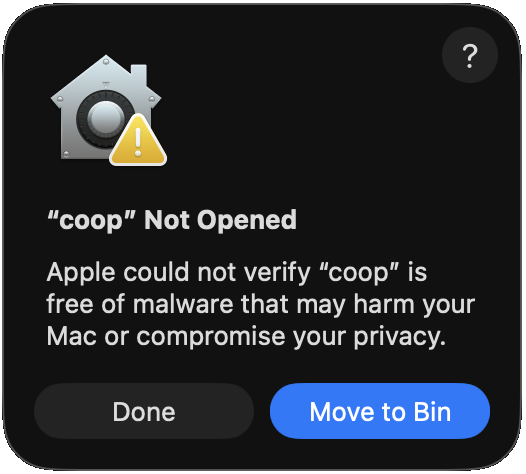
Whelp#
I could not find a single page describing all this (edit: I just found a pretty good doc on the Homebrew site, actually: Casks have a different trust model), but what's going on seems to be:
- macOS on AArch64 won't run ARM64 code that doesn't have a signature, but even an "ad-hoc" one is fine (source)
-
The linker does sign the binaries from
cargo buildwith an ad-hoc signature, so that's fine -
Homebrew Cask marks downloaded binaries as downloaded by setting the
com.apple.quarantinexattr on them (and is quite reasonably removing support for not doing that) -
Trying to run a binary with the
quarantinexattr on it triggers Gatekeeper, which by default requires the binary to be both signed with an Apple Developer ID and then also notarised by Apple. Notarisation requires the binary be uploaded to Apple and pass some malware checks, and if it passes, Apple issues a notarisation ticket that Gatekeeper can verify.
You can allow-list binaries, but it's being made increasingly difficult - Sequoia removed the control-click workaround for this and the current workaround is a temporary button in Settings → Privacy & Security:

So, that was something of a waste of time. Options to make it work:
- Get an Apple Developer account myself and have the binaries signed and notarised
- Add
xattr -d com.apple.quarantineto the cask and bypass all this -
Instead of a cask, create a formula that uses
bin.installto simply install the binaries rather than building them, avoiding Casks's provenance checks entirely and trusting upstream to not distribute malware, and ignoring the source entirely - Document that one needs to go to Settings and click two buttons after install and every update
None of these are excellent, and the other-other option is: make a normal Homebrew formula instead, which downloads the source and builds it or uses prebuilt binary bottles, which is what I'll do next.
So, lesson learnt: casks are only sensible for binaries where upstream has already interacted with Apple to have them signed and notarised.